Key Influencers.
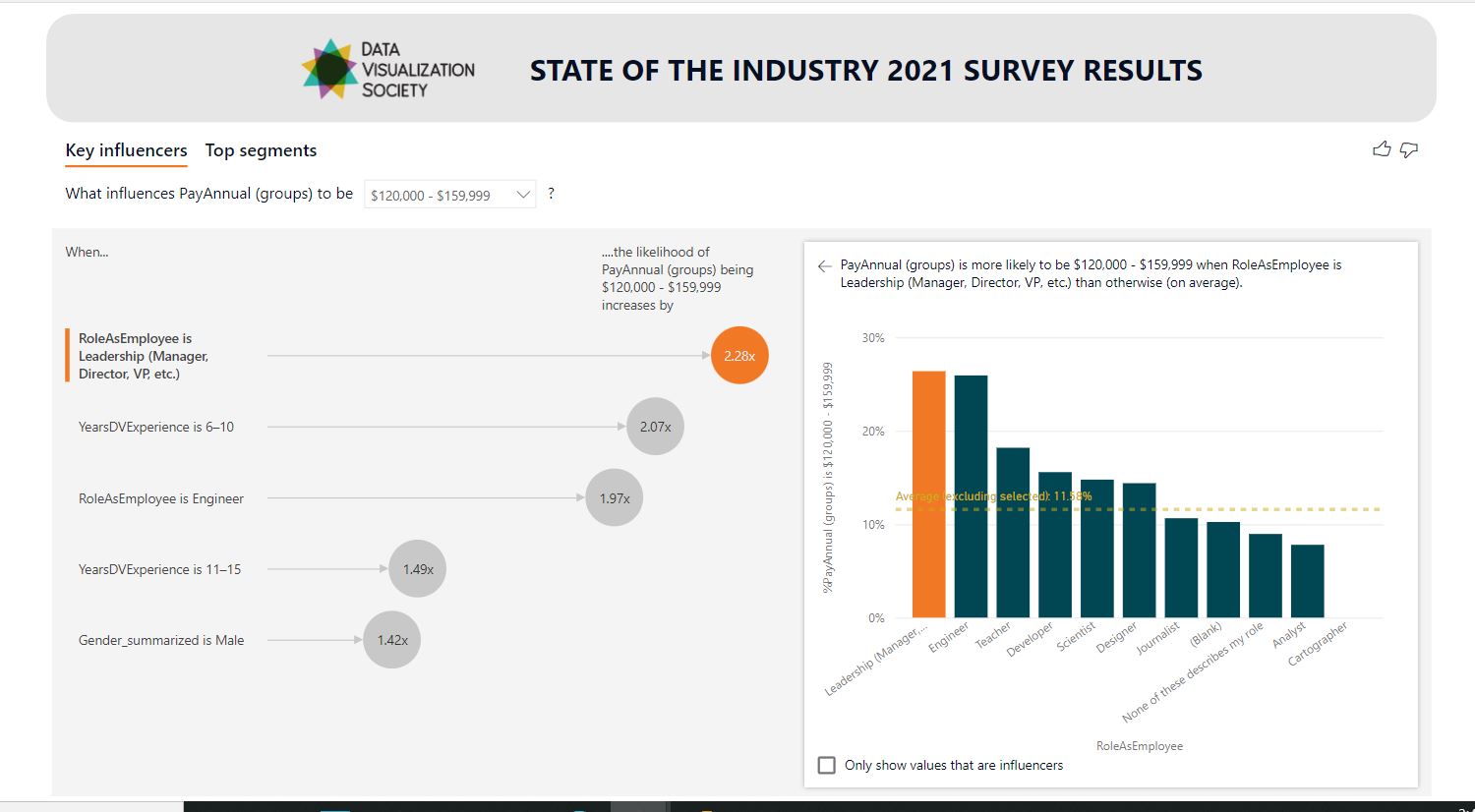
Explore Data Visualization Society‘s annual "State of the Industry 2021" survey results. This uses AI functionalities in Power BI for this key influencers visual. Due to the limitations for this visual, please view this PDF file version instead.
Part of the Power BI Work Out Wednesday Challenges, reference below.
 |
Data Source:
Data Visualization Society’s annual State of the Industry survey. Data can be found in full (in Google sheets) here.
Challenge Requirements
- This week’s challenge requires a Google account to use the Google sheets custom connector.
- If you are pulling the data yourself, load data for the year 2021
- In Power Query, keep columns of interest that you suspect may influence annual compensation. I used:
- Role (column: Role (as employee)
- Education Level (column: EducLevel)
- Years of Data Viz Experience (column: YearsDVExperience)
- Gender (column: Gender_summarized)
- Member of historically disadvantaged or underrepresented racial or ethnic group (column: RacEthHistUnderrep_)
- Filter out respondents where Role (as employee) is blank. This will help us look only at individuals working in full-time roles. This step is optional – if you’re more interested in freelance workers or if you’d like to analyze both, go for it!
- The PayAnnual column contains 15 distinct pay groups. Narrow the number of groups down using either a conditional or custom column.
- I used groupings of $40k and stopped at $160k (grouped anything $160k or greater)
- Add a sort order column so your pay groupings appear in the correct order.
- Add the Key influencers visual. Use Annual Pay in the Analyze field and add other columns of interest in the Explain by field.
- Customize the formatting – I used colors from the Data Visualization Society logo.
- I use Colour Contrast Analyzer to ensure my colors are accessible. This also gives you hex values!
- Explore the results of the Key influencers visual. Look at the Top segments tab to see more detail.
- Get creative with your design and share!
Reference: https://www.workout-wednesday.com/2022/02/09/pbi-2022-w06/
Please look at more fun examples of my skills and projects in my Siri's Power BI portfolio.
Check my homepage here: Siri Shultz homepage